I’ve tested quite a few AI video tools over the past year, especially with the rise of AI avatars for content creation. Some were impressive, others felt clunky or too complicated. That’s when I came across Zoice, which is often mentioned as one of the best AI avatar generator tools right now.
What caught my attention was its promise to create realistic AI avatar videos without needing any camera setup, editing skills, or expensive production tools. As someone who creates content regularly, I wanted to see if it could actually save time and still deliver professional-looking results.
So I decided to give it a proper test, not just a quick trial. Here’s my honest experience after using Zoice for a while.
What is Zoice?
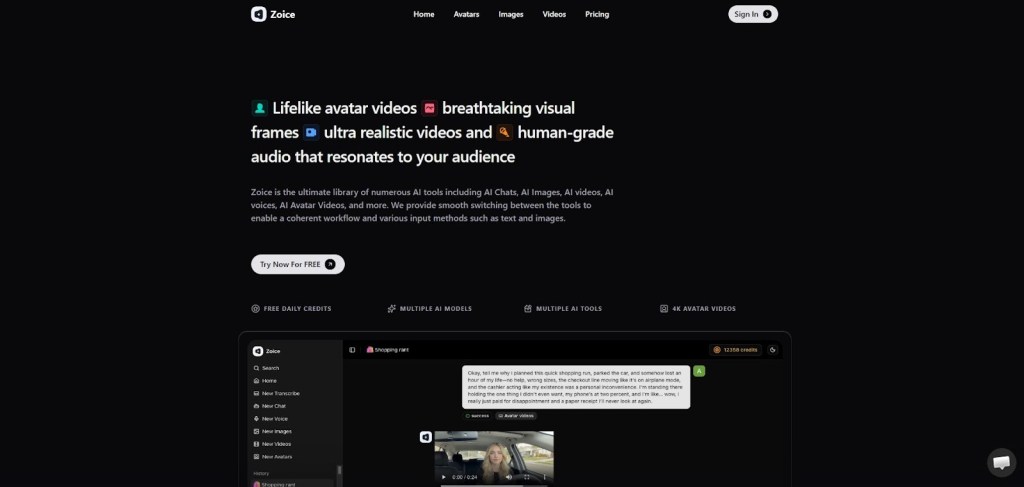
Zoice is an AI avatar video generation platform that allows you to create videos using digital avatars that speak your script. Instead of recording yourself on camera, you simply type your content, choose an avatar, and let the tool generate the video.
It falls under the category of AI video generators, but more specifically, it focuses on AI avatars or “AI twins.” This means you can create consistent video content without being physically present.
The main goal of Zoice is to simplify video creation for people who want scalable, fast, and professional-looking content without the usual production effort.
My Experience Using Zoice
When I first signed up, the onboarding process was pretty smooth. I didn’t have to go through a complicated setup. The dashboard felt clean and easy to understand, which was honestly a relief because many AI tools tend to overwhelm you right away.
I started by creating a simple video using one of their pre-built avatars. The process was straightforward: I added my script, selected a voice, chose an avatar, and hit generate. The rendering took a few minutes, which felt reasonable considering it was generating a full video.
What impressed me initially was how natural the avatars looked compared to some other tools I’ve tried. The lip-sync was fairly accurate, and the voice didn’t sound overly robotic.
That said, it’s not perfect. In some cases, the tone of the voice felt slightly off depending on the script, especially for more emotional or dynamic content. But for informational or marketing-style videos, it worked really well.
Overall, my first impression was that Zoice is designed for speed and simplicity rather than deep customization. And honestly, that’s exactly what many creators need.
Key Features of Zoice
AI Avatar Generation
The core feature of Zoice is its ability to generate videos using AI avatars. You can choose from different avatars that represent various styles and use cases. What I liked is that the avatars don’t feel completely generic, they have a more polished and professional look.
This feature is especially useful if you want to create consistent content without appearing on camera. It saves time and removes the need for retakes or editing mistakes.
Text-to-Video Conversion
Zoice allows you to turn simple text into a complete video. You just paste your script, and the platform converts it into a spoken video using an avatar.
From my experience, this is where Zoice really shines. It eliminates the need for recording equipment or voiceovers. For content creators or marketers, this can significantly speed up production.
Multiple Voice Options
The platform provides different voice options, which you can match with your avatar. Some voices sound more natural than others, so I recommend testing a few before finalizing your video.
I found this feature useful when trying to match the tone of different types of content, like tutorials vs promotional videos. It adds flexibility without making things complicated.
Fast Video Rendering
One thing I appreciated was the rendering speed. Compared to some tools that take forever, Zoice processes videos relatively quickly.
This makes it practical for creating multiple videos in a short time. If you’re working on bulk content or social media campaigns, this feature can save a lot of time.
Simple and Clean Interface
Zoice doesn’t try to do too much in one place, and that actually works in its favor. The interface is clean, and you don’t need a learning curve to get started.
Even if you’re not tech-savvy, you can figure things out quickly. I was able to create my first video within minutes without watching any tutorials.
Who Should Use Zoice?
Zoice is not for everyone, but it’s extremely useful for certain types of users.
If you’re a content creator who wants to produce videos regularly without recording yourself, this tool can be a game-changer. It removes the pressure of being on camera while still letting you create engaging content.
Marketers and businesses can also benefit a lot. You can create product explainers, ads, or training videos without hiring actors or setting up shoots.
It’s also helpful for educators or freelancers who want to deliver video content quickly without spending hours on production.
Pros and Cons
Pros
- Very easy to use, even for beginners
- Saves a lot of time compared to traditional video creation
- Good quality avatars with decent realism
- Fast rendering makes it scalable for bulk content
- No need for camera, mic, or editing tools
Cons
- Advance tools need subscription
Pricing
Zoice offers multiple pricing plans depending on your usage needs.
- Free Plan – $0/month with 50 credits per day
- Starter Plan – $7.99/month with 4,000 credits
- Basic Plan – $29.99/month with 17,000 credits
- Creator Plan – $49.99/month with 30,000 credits
- Agency Plan – $89.99/month with 50,000 credits
From my experience, the Starter plan is good if you’re just testing things out. But if you plan to create content regularly, the Basic or Creator plans feel more practical.
Considering how much time it saves, I’d say the pricing is reasonable, especially for businesses or serious creators.
How It Compares to Other Tools
I’ve tried a few other AI avatar tools before, and most of them either focus too much on realism or too much on complexity.
Zoice sits somewhere in the middle. It offers a good balance between ease of use and output quality.
Some competitors might offer more advanced customization, but they often come with a steeper learning curve. Zoice, on the other hand, is built for speed and simplicity.
That’s what makes it stand out as one of the best AI avatar generator tools for everyday use.
FAQs
Is Zoice good for beginners?
Yes, absolutely. The interface is simple, and you don’t need any prior experience to start creating videos.
Can I use Zoice for commercial projects?
Yes, you can create videos for marketing, ads, or client work depending on your plan.
How realistic are the AI avatars?
They are fairly realistic compared to many tools, especially for professional or informational content. However, they may not fully replace human-level expressions.
Does Zoice support multiple languages?
It depends on the available voice options, but many AI tools like this usually support multiple languages. You should test based on your needs.
Is it worth the price?
If you create videos regularly, then yes. The time and effort it saves can easily justify the cost.
Final Verdict
After spending time with Zoice, I can say it delivers exactly what it promises. It simplifies video creation and makes AI avatar content accessible to almost anyone.
It’s not the most advanced tool in terms of customization, but that’s not really its goal. It focuses on speed, ease of use, and consistent output, and it does that well.
If you’re looking for the best AI avatar generator tool that doesn’t overwhelm you and still produces solid results, Zoice is definitely worth trying.
 AIToolsHub
Leave a comment