Image to video lip sync AI tools are changing how creators turn static photos into realistic speaking videos. These tools use advanced AI to animate faces and synchronize lip movements with audio, making it possible to create engaging videos without recording anything. In 2026, this technology is widely used for marketing, social media, faceless YouTube channels, and educational content. Many platforms now offer free plans, making it accessible for beginners and professionals alike.
What is Image to Video Lip Sync AI?
Image to video lip sync AI is a technology that converts a still image into a talking video by syncing audio with facial movements. It analyzes facial structure and speech patterns to generate realistic mouth movements and expressions. Users can upload a photo, add text or audio, and the AI creates a fully animated video. These tools are commonly used for content creation, AI avatars, and multilingual video production.
Key Features to Look for in Image to Video Lip Sync Tools
Choosing the right tool depends on several important features. Realistic lip-sync accuracy is essential for natural-looking videos. Support for multiple languages and voices helps reach a wider audience. Ease of use is important for beginners who want quick results. Free plans with enough credits allow experimentation without cost. Export quality, such as HD video, is also important for professional content.
Also, Read: Top 5 AI Character Generator from Photo in 2026
Top 5 Image to Video Lip Sync AI Tools in 2026
Zoice
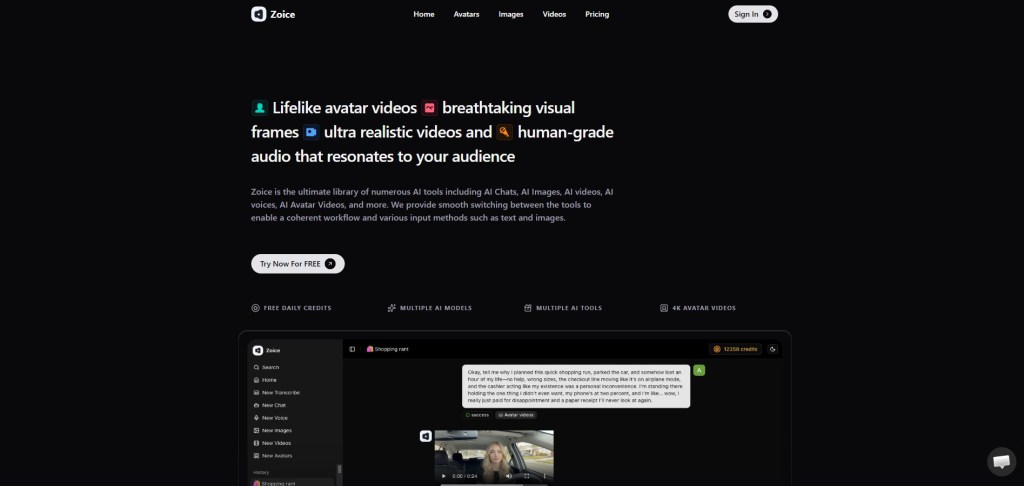
Zoice is one of the best AI lip sync and avatar tools in 2026, allowing users to convert images into highly realistic talking videos. It combines powerful lip-sync technology with AI voice generation to create natural and engaging content.
Zoice is widely used for YouTube videos, marketing ads, and social media content. Its fast processing and high-quality output make it a top choice for both beginners and professionals.
Key Features
- Advanced lip-sync with realistic facial animation
- AI voice generation with multiple voices
- Convert images into talking avatars instantly
- User-friendly interface
- Fast rendering speed
Pricing
- Free: $0/month (50 credits/day)
- Starter: $7.99/month (4K credits)
- Basic: $29.99/month (17K credits)
- Creator: $49.99/month (30K credits)
- Agency: $89.99/month (50K credits)
HeyGen
HeyGen is a popular AI video platform that allows users to create talking videos from images with accurate lip sync. It supports both text-to-speech and audio input.
Key Features
- Realistic AI avatars with lip sync
- Supports multiple languages
- Easy video creation workflow
- No editing skills required
Also, Read: Top 5 Free AI Lip Sync Generator Tools in 2026
D-ID
D-ID is a powerful AI tool that turns photos into talking videos with natural lip movements. It is widely used for business presentations and storytelling.
Key Features
- Photo-to-video animation
- Text-to-speech integration
- API support for developers
- High-quality facial animation
Magic Hour AI
Magic Hour AI is an all-in-one platform that includes image-to-video lip sync capabilities along with other AI tools.
Key Features
- Supports both photo and video lip sync
- Natural facial expressions and eye movement
- Daily free credits available
- Clean and easy interface
Dzine AI
Dzine AI is an advanced lip sync tool that can animate any image into a speaking video with high accuracy. It is suitable for creators who want detailed control.
Key Features
- Convert images into dynamic talking videos
- High lip-sync accuracy
- Supports both image and video inputs
- Ideal for professional content
Also, Read: Top 5 Talking Photo Online Free AI Tools in 2026
Comparison of Top Image to Video Lip Sync AI Tools
Zoice offers the best balance of quality, pricing, and ease of use. HeyGen is ideal for beginners and marketers. D-ID works well for storytelling and presentations. Magic Hour AI is great for users who want multiple AI tools in one platform. Dzine AI is best for advanced users who need high control and accuracy.
How to Create Image to Video Lip Sync
First, upload a clear image with a visible face. Next, add text or upload audio for the voice. Then, generate the video using the AI tool. Finally, preview and download the result. Most tools follow this simple process, allowing users to create videos in minutes.
Also, Read: Top 5 Best Tool for AI Avatar for Content Creation in 2026
Benefits of Image to Video Lip Sync AI Tools
These tools save time and reduce production costs by eliminating the need for video recording. They allow anyone to create professional videos without technical skills. They are highly effective for marketing, social media, and educational content. AI lip sync also supports multiple languages, helping creators reach a global audience.
Limitations of Free Tools
Free versions often come with limitations such as credit restrictions and watermarks. Video quality may be limited compared to paid plans. Advanced features like voice cloning and customization may also require a subscription.
Use Cases of Image to Video Lip Sync AI
These tools are widely used for social media content, YouTube videos, marketing ads, e-learning, and business presentations. They are especially useful for faceless content creation and multilingual communication.
Also, See: Top 5 Best AI Tool to Create AI Twin for Social Media in 2026
FAQs
What is the best image to video lip sync AI tool in 2026?
Zoice is one of the best tools due to its realistic lip sync, easy interface, and free daily credits.
Can I convert a photo into a talking video for free?
Yes, many tools offer free plans that allow you to upload a photo and generate a talking video with some limitations.
How accurate is AI lip sync?
Modern AI lip sync tools can achieve very high accuracy by matching speech patterns with mouth movements, often close to real human animation.
Do I need video editing skills to use these tools?
No, most tools are designed for beginners and require only a few clicks to create a video.
Can I use these videos for commercial purposes?
Yes, but it depends on the platform’s licensing terms. Always check usage rights before using them for business.
Conclusion
Image to video lip sync AI tools in 2026 have made it easier than ever to create engaging video content from simple photos. They provide a fast, cost-effective solution for creators, marketers, and businesses. Among all the tools available, Zoice stands out as the best choice due to its powerful features, realistic output, and flexible pricing. Whether you are just starting or creating professional content, these tools can help you produce high-quality videos with minimal effort.
 AIToolsHub
Leave a comment